
Lector: Sermon Teleprompter


by DANIEL CLARENCE MAASENSermonsAssistive AI
A teleprompter that follows your voice as you preach.
Assistive AI
AI use
2/5
Confidence
60%
MediumHow sure our AI review was that this rating is right, from what the app's store listing, privacy policy, reviews and screenshots show. We publish a rating only at medium or high confidence.
Uses speech recognition to follow the speaker's voice; it does not write any content.
Examples
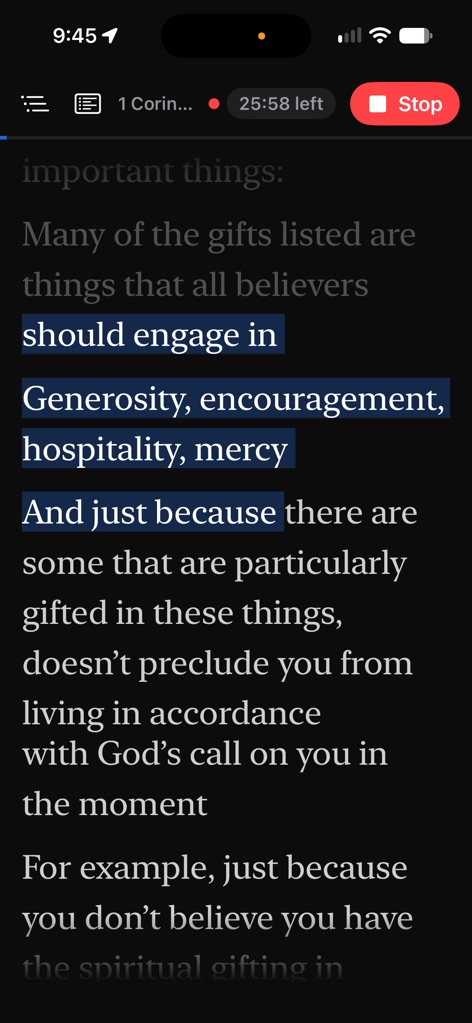
the app follows your voice through the text
App Store listing
About
A teleprompter for preachers and speakers that listens as you speak and scrolls your manuscript along, highlighting upcoming words. Manuscripts can be pasted or imported from PDF, Word, RTF and text files, with jump points built from headings.
From the developer
Lector is a teleprompter that listens. Paste or import your manuscript, tap Listen, and the app follows your voice through the text. The next words you need are highlighted ahead of you, and the page scrolls along as you speak. If you ad-lib, it waits until you return to the text.
Built for preachers and speakers who want to look up from the page.
- Voice tracking: the words coming up next are highlighted, from 1 to 15 words ahead as you choose.
- Easy to add: paste from Notes, or import PDF, Word, RTF and text files.
What it costs
Free
Advertising
See the ads Lector: Sermon Teleprompter runs, straight from the platforms' public ad libraries.
Questions and answers
What is Lector: Sermon Teleprompter?
Lector: Sermon Teleprompter is a teleprompter for preachers and speakers that listens as you speak and scrolls your manuscript along, highlighting upcoming words.
Is Lector: Sermon Teleprompter free?
Yes. Lector: Sermon Teleprompter is free to download.
What file types can Lector import?
Its listing says you can paste from Notes or import PDF, Word, RTF and text files.
What happens in Lector if I ad-lib?
Its listing says the app waits until you return to the text.
Does Lector: Sermon Teleprompter use AI?
Yes. Uses speech recognition to follow the speaker's voice; it does not write any content. We rate its AI use 2 of 5 (Assistive AI). How we rate AI use.
What devices does Lector: Sermon Teleprompter work on?
Lector: Sermon Teleprompter is available on iOS, from the App Store.
Who makes Lector: Sermon Teleprompter?
Lector: Sermon Teleprompter is published by DANIEL CLARENCE MAASEN. It first came out on Nov 19, 2026.
What are some apps like Lector: Sermon Teleprompter?
Other sermon prep tools we list include Sermon Notes PRO - Learn Apply, Preach: Sermon Builder, and Sermonary.


